In today’s era, the computer has become an essential part of our lives. Whether it is office work, education, or entertainment, we rely on computers for everything. But there comes a time when our computer starts to slow down, programs open late, and freezing repeatedly during work causes a lot of frustration. Many people think that perhaps the computer has become old and needs to be replaced, but the reality is that in most cases, with some basic changes and maintenance, you can make your old computer as fast as a new machine again.
Reasons for a computer slowing down
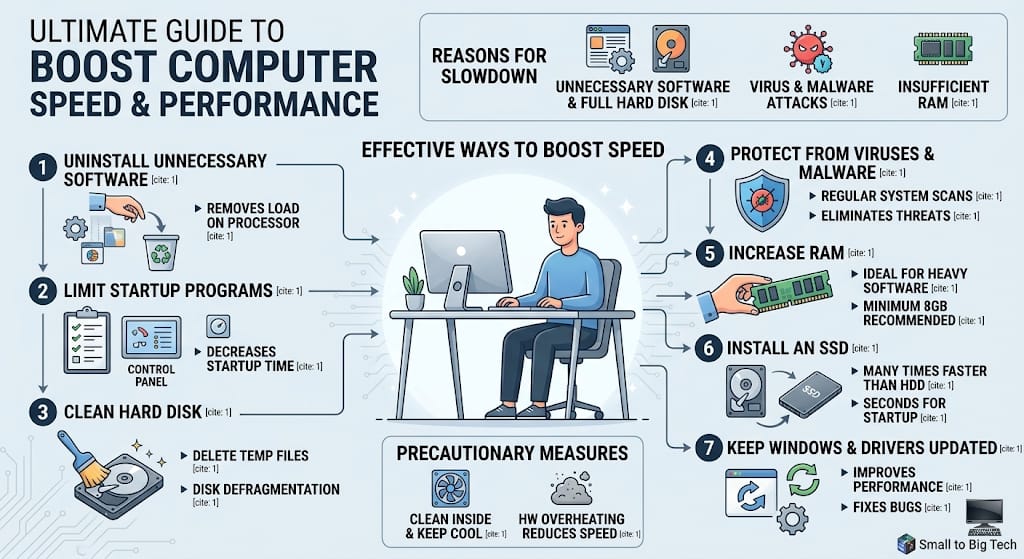
There can be several reasons for a computer to slow down. The most common reasons include a heavy amount of unnecessary software on the computer, a full hard disk, virus attacks, or insufficient RAM. Often, we install software that starts running automatically as soon as the computer turns on and wastes a large portion of the computer’s capacity.
Effective ways to increase computer speed
Remove unnecessary software
The first step is to check your computer and uninstall all the software that you do not need. Many programs keep running in the background, which puts a load on the processor. Going into the control panel and removing unnecessary programs immediately lightens the computer.
Limit startup programs
When you turn on the computer, many programs start automatically. This increases your computer’s startup time significantly. Through the task manager, you can disable the programs that are not needed when the computer starts. This method proves to be the most effective in increasing the computer’s speed.
Clean the hard disk
If your hard disk is completely full, the computer will slow down. For this, use Disk Cleanup. It is necessary to delete temporary files that accumulate in the computer over time. Additionally, Disk Defragmentation is an excellent method that organizes the data on the hard disk, which increases the speed of opening files.
Protection from viruses and malware
Many times, the reason for a computer slowing down is a virus. Install a good antivirus on your computer and update it regularly. Scanning the entire system eliminates threats that affect the computer’s performance.
Increase RAM
If your work involves using heavy software, such as video editing or graphic design, your computer’s RAM might be low. Increasing RAM is a permanent and best solution to increase computer speed. In today’s era, at least 8GB of RAM has become necessary for a common user.
Use an SSD
If you are still using an old Hard Disk Drive (HDD), remove it and install a Solid State Drive (SSD). This change will increase your computer’s speed many times over. It brings the computer startup time and the program opening time down to seconds.
Keep Windows and drivers updated
Always keep your operating system and hardware drivers up to date. Microsoft often releases updates that improve system performance and fix old bugs.
Precautionary measures
To maintain computer performance, it is necessary to clean it from time to time. Dust accumulation inside the computer causes the hardware to heat up, which reduces speed. Keep the cooling fan clean and use the computer in a cool place.
Conclusion
Increasing computer speed is not magic but just a matter of proper maintenance. If you follow the methods mentioned above, your computer will not only become faster but its lifespan will also increase. In the technical world, always learning is the key to success.
Is your computer running slow too? Have you thought about trying any of these methods? Share your experiences in the comments!
Stay connected with Small to Big Tech for more such technical information.